
01 / The opportunity
Why might someone buy this?
The useful difference to test is a repeatable two-device layout with removable case access and planned cable slack. It must beat an inexpensive Pi case, ordinary clips and a flat tray; tidiness alone may not justify a model-specific product.
Who might need it?
- Reachy Mini Lite makers with a working Raspberry Pi host who want a dedicated desk layout.
- Educators and demonstrators who repeatedly arrange the same robot, case and leads.
- Not a first-time plug-and-play conversion kit, a general Reachy accessory for every model, or a carrying system.
The specific task is arranging an already functioning external-computer setup. BenchLink would not turn Lite into Wireless, make an unsuitable Pi application work, or add computing capability.
A body-mounted computer can consolidate a build but introduces robot-interface, motion and thermal questions. A separate station trades some desk area for physical separation and ordinary case access.
The proposed base is for stationary use. Do not treat an unfastened robot as secured for carrying. If the owner rarely touches an already tidy setup, there may be no worthwhile problem to solve.
02 / Existing solutions
How owners handle it today.
| Current solution | What it does | What remains |
|---|---|---|
| Use the usual computer and USB connection ↗ | Official setup uses the supplied robot PSU plus a USB connection to a computer; a laptop or desktop avoids a separate Pi installation. | A laptop may already be the best option. For owners choosing a dedicated Pi, it does not organize the extra case and leads. |
| Make a computer backpack ↗ | A recent maker build documents custom packaging for its Pi and board stack. | That is a project-specific solution. Its latest guard is described as a rendering awaiting fit, motion and thermal checks; it is not evidence that every attached design works. |
| Put a ventilated Pi case beside the robot ↗ | The official Pi 5 Case provides cooling and access; a community Lite/Pi guide describes off-robot placement and relaxed cable routing. Ordinary clips can arrange the leads. | This may be sufficient. The station must add repeatable placement and convenient removal worth its footprint and extra price; it cannot claim exclusive cooling or HAT capability. |
What a better product would need to do
- Measure the stationary underside and full permitted motion envelope of one Lite revision. The base must not enclose vents, restrain the body or interfere with the existing foot support.
- Retain an enclosed, independently powered Pi in a removable case carrier. Start with one measured official Pi 5 Case and no added HAT; do not promise a universal slot.
- Route USB and two separate power leads through open, generous-radius guides outside moving parts. Preserve enough slack and connector access; pulling a guide must not tension a plug.
- Leave the Pi case fan inlet, outlet, lid and ports clear. Compare temperature and audio pickup with the same case alone before making any performance claim.
- Use a base joint that stays flat and feet that do not mark the desk. The robot remains removable and unfastened; the station is not a transport product.
03 / Research evidence
How strong is the evidence?
Opportunity type: Observed DIY / accessory improvement for a narrow developer setup
A September 3 build documents a Pi 5 host and custom packaging, while current official Lite documentation confirms the external-computer architecture. A second community guide describes a Pi 4 deployment but leaves its exact physical arrangement undocumented. These establish an activity and integration task, not a recurring complaint or a market for this station.
Reachy Mini Lite uses a separate host computer and supplied wall power. A dated builder account uses a Raspberry Pi 5 and describes a custom enclosure; the current official Pi 5 Case already offers a fan and removable lid. The physical station is proposed here.
Some owners who prefer a separate host may value fixing its position relative to the robot without loading a robot-mounted bracket. A removable case holder and open service-loop guide are a plausible convenience improvement.
How often this setup needs reorganizing, how many Lite owners use a Pi, exact base and case fit, motion clearance, fan-noise effects, thermal behavior and whether owners prefer this over a cheap case and clips at the delivered price.
Selected evidence
A recent Pi-hosted Lite build and custom packaging ↗
Documents a Reachy Mini Lite/Pi 5 learning build and a custom computer backpack. The latest guard's fit, movement and thermal checks remain open.
Post: · Checked: A single project, not a complaint survey. Its latest assembly is illustrated as a rendering; it does not validate BenchLink or demand for a separate station.Current official Lite connection and host guidance ↗
Specifies supplied wall power and USB data to a computer. Warns that the desktop app may not work on ARM64 and offers the Python SDK alternative.
Checked: Current documentation without a retrieved page-specific date; this is architecture and setup guidance, not verification of every Pi/software combination.Community Lite/Pi 4 deployment guide ↗
Describes a reference Lite/Pi 4 deployment and a conservative separate-host arrangement with independent power.
Checked: Public guide leaves exact reference OS, mounting arrangement and several hardware details unrecorded. It is not Pi 5 case fit evidence or independent proof of a packaging defect; document date was not established.There is a current Lite product and a recent owner-built Pi integration, not a measured installed base for Pi-hosted Lite systems. A community guide adds another documented deployment but no packaging preference. The case retailer displayed one dated 2025 review; that concerns the case only. No station demand or recurring-problem rate is established.
Search interestNo dependable keyword-volume data, Search Console export or reproducible Google Trends series was available. Search intents worth checking are Reachy Mini Lite Raspberry Pi setup, Pi host enclosure and cable layout. Search discovery shows that the task is documented, not how much traffic or purchase intent it has.
04 / Product design
How the product could work.
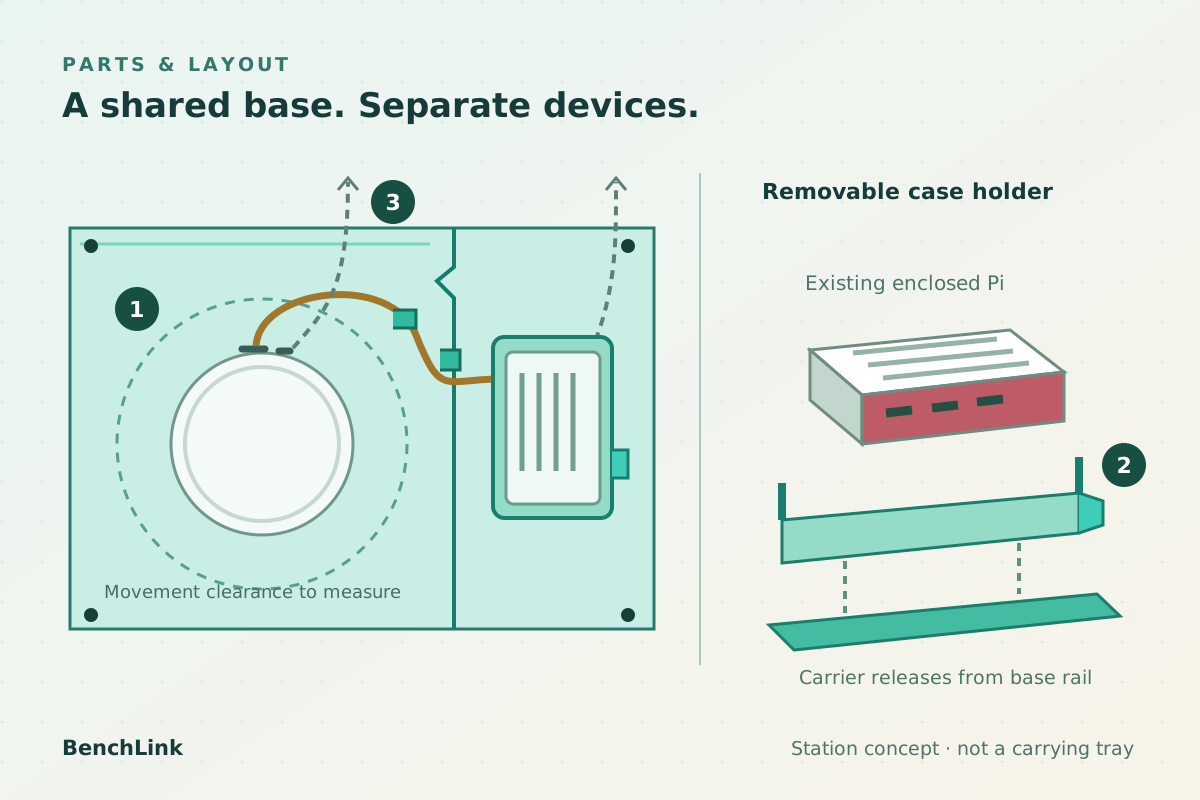
- 1 · Flat robot zoneSupport the existing foot normally; no robot clamp or carry retention. Measure underside ventilation and motion clearance.
- 2 · Removable case carrierHolds one specified existing case beside the robot, with release access and unobstructed vents.
- 3 · Open cable pathKeep USB slack and two separate power leads accessible. No electrical circuitry is included.
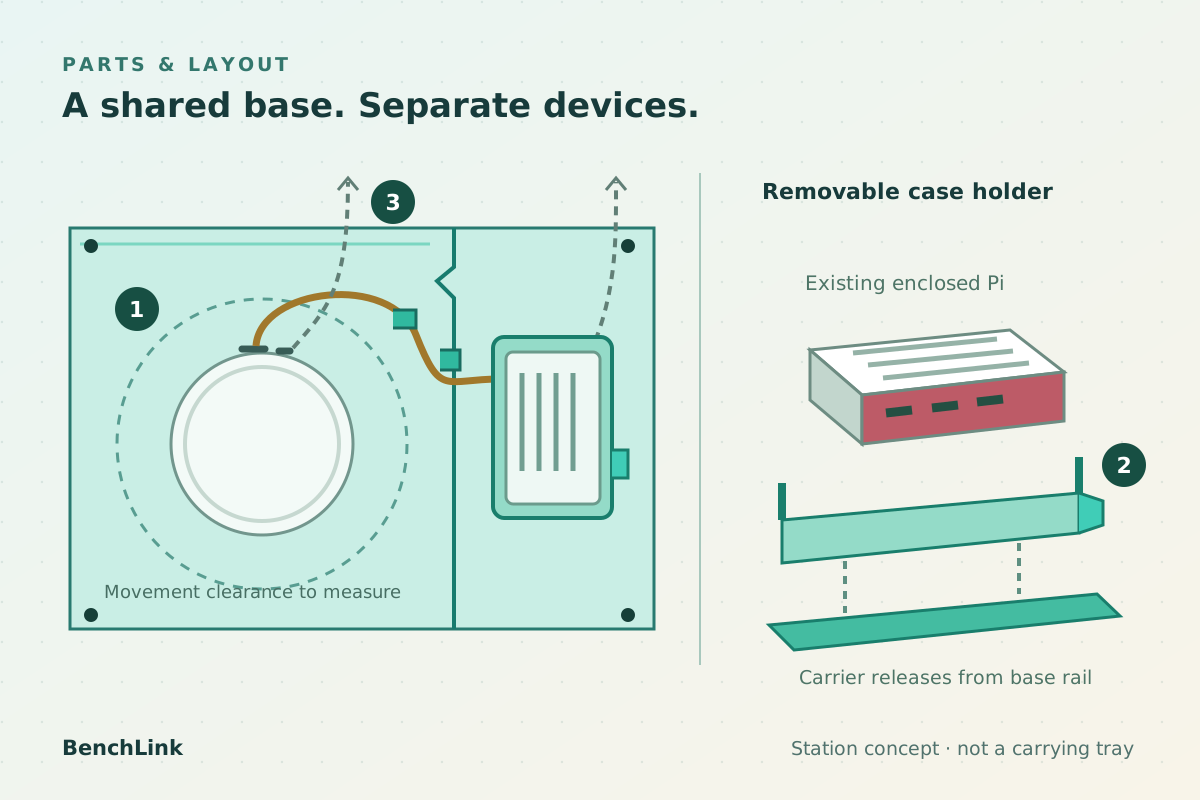
- 1 · Flat robot zoneSupport the existing foot normally; no robot clamp or carry retention. Measure underside ventilation and motion clearance.
- 2 · Removable case carrierHolds one specified existing case beside the robot, with release access and unobstructed vents.
- 3 · Open cable pathKeep USB slack and two separate power leads accessible. No electrical circuitry is included.
- Join two shallow base panels on the desk. The left zone supports the robot normally; the right zone carries a raised removable Pi-case holder. Nothing hooks onto Reachy's shell, head or rotating body.
- With power disconnected, slide the owner's specified enclosed Pi into the side holder. Use contact pads away from its fan openings and ports, with an accessible release tab. The case remains the electronics enclosure.
- Connect the existing USB data lead and route a relaxed loop through an open rear guide. Keep the supplied robot PSU lead and the Pi supply lead separate, labeled and accessible. Connector placement is schematic until one Lite revision is measured.
- Use the station only after confirming all motion paths and ventilation remain clear. Release the Pi-case holder for service; remove both devices before relocating the base. There is no shared power circuit or carry retention.
Directions worth considering
Shared desk base with removable case holder — recommended
Benefit: Keeps the host separate from moving robot parts and reuses an existing enclosed Pi. Cable guides and a defined layout can be evaluated cheaply.
Tradeoff: Adds footprint and parts; an ordinary case and clips may be equally useful. Clearance and fan effects need testing.
Custom body-mounted computer backpack
Benefit: An observed DIY direction that places the host on the robot rather than elsewhere on the desk.
Tradeoff: Requires model-specific attachment, mass, access and motion checks. The recent example is not a validated universal product; do not copy its design.
Case-and-cable guide bundle without a base
Benefit: Cheapest and simplest to distribute, using an existing case plus standard clips and a clear arrangement guide.
Tradeoff: Little differentiation from ordinary parts. It may be the better answer if owners do not value a shared station.
Our recommendation: Prototype the separate shared base around an existing enclosed case. Test the placement/removal advantage before designing an electronics enclosure. If ordinary clips and a case do the task equally well, favor a useful setup guide and stop the product rather than adding features.
Build the first version
Two joining, low-profile base panels; a removable holder for one specified existing Pi 5 case; soft feet; three open cable guides; two power-lead labels; and a placement guide. Reachy sits unfastened on the flat robot zone. The owner supplies a working Lite/Pi system and both original-rated supplies. No exposed-board mount, robot attachment, carry handle, electrical conversion or HAT accommodation.
Materials and production options
- First mockup: full-size card panels and printed PETG case-holder/guide samples, with soft silicone contact pads. Determine geometry on measured hardware rather than printing the illustration.
- Candidate small-batch product: CNC-cut polymer panels with rounded edges and a captive joining key, printed nylon or PETG carrier and sourced soft feet. Check creep, flatness, tab fatigue and surface marks.
- Consider molded panels/carriers only after fit and repeat-use preference are established. Quote finishing, joint hardware, pads, assembly, inspection and packing; do not expose a bare board as a shortcut.
Prototype checks
- Document one current Lite revision and one official Pi 5 Case. Measure the underside, rear connectors, foot contact, case ports, vents and lid access; map permitted head, antenna and body movement before choosing the station footprint.
- Build an adjustable layout mockup with an existing cased Pi. Verify removal, connector reach and cable slack while unpowered. Keep guides clear of joints; test a mild accidental cable tug without transmitting load to either device.
- After clearance screening, run the same supported software task with the case alone and in the station. Record case temperature/throttling, USB errors and fan sound in robot audio. The station must not worsen operation.
- Compare repeated setup and Pi access against a plain case plus ordinary clips, including on a small desk. Record time, plug strain, access mistakes, preferred footprint and whether the station is actually kept in use. No such comparison has yet been performed.
05 / Business assumptions
Could this support a business?
This is a narrow accessory for existing Lite owners, not the whole Reachy market. It could suit a small robotics-accessory or fabrication business with measured fit and clear setup guidance. A flat-pack format may help delivery, but at $39 the part, packing, support, returns and acquisition costs still need quotes. Do not count a Pi sale or a Wireless buyer as a station customer.
Price to test
Ask about $39 USD for the physical station kit, plus delivery, excluding Pi, case, robot, cables, supplies and software. The official Pi 5 Case was $10.95 and in stock at PiShop US on October 25. That is a cheap baseline component, not an equivalent complete station or evidence that an extra $39 is acceptable.
Costs still to verify
No measured BOM or supplier quote is available, so unit cost and margin are unknown. Obtain sample and repeat-batch quotes for panels, carrier, guides, joining key, pads, labels, finishing and inspection. Include bulky-item packing, delivery, fees, support, returns and acquisition costs before judging the $39 target.
Where the first customers might come from
Existing Lite owners running a Pi, workshop organizers and developers showing a working robot-and-host arrangement. A useful tutorial comparing a plain case with the station could answer setup searches. Search visibility, permitted community demonstrations and referrals are possible channels, not an established audience or partner agreement.
06 / Next experiment
What should a builder test first?
The first decisive test: Compare a full-size cardboard/printed station with the same working Lite/Pi setup in its ordinary case and adhesive cable clips. Establish clearance, cable slack and case ventilation first, then compare repeated setup, access and desk preference. Stop if the station adds bulk without a useful handling benefit.
Next validation steps
- First compare one working Lite/Pi 5 setup with and without a crude station. Do not start with tooling or a newly integrated power system.
- As an exploratory plan, later observe six adult Lite/Pi owners arranging and servicing their setups with each method. Six is a proposed learning sample, not a statistical demand threshold. Record task differences and continued preference, not just compliments.
- Use the consumer page to separate actual Lite/Pi owners from laptop users, Wireless owners and general interest. Ask which case they use and the price question; stated waitlist interest is not a sale.
- Continue only if the station improves a concrete handling task without affecting movement or cooling and owners value that improvement. Otherwise publish useful setup guidance instead of a product.
What would make us drop this idea?
- A plain Pi case and cable clips are as convenient, and participating owners prefer their lower price and smaller footprint.
- A practical footprint cannot leave the selected robot's motion, vents and connections clear.
- The carrier obstructs cooling, adds objectionable fan noise or causes USB/power instability.
- Eligible Lite/Pi owners do not want a shared station at the delivered price, or most interested visitors do not actually use this setup.
Practical risks to check before going further
- The layout may consume more desk area than a separate case, or interfere with underside support, body rotation, ports or ventilation.
- A cable guide can increase connector load if slack is wrong. The kit must not encourage powering the robot from a Pi USB port or a shared unverified supply.
- Case cooling or fan noise may worsen despite an open layout. No thermal or acoustic benefit is assumed.
- Owners may prefer a cheap case, clips or their own print. A small fit-specific audience may not support shipping and support costs.
- A removable holder may be mistaken for carry retention. Instructions and the design must make stationary use clear.
Explore building this idea
Start with the prototype plan and compare it with the existing alternatives. The consumer page shows how the proposed benefit and price could be presented to owners.
Go to the prototype plan ↑View BenchLink for owners ↗07 / Sources
Sources behind this idea.
Post dates show when the underlying evidence appeared; checked dates show when the source was reviewed.
- A recent Pi-hosted Lite build and custom packaging ↗Forty First Hour — firsthand maker account · Post · Checked
Documents a Reachy Mini Lite/Pi 5 learning build and a custom computer backpack. The latest guard's fit, movement and thermal checks remain open. A single project, not a complaint survey. Its latest assembly is illustrated as a rendering; it does not validate BenchLink or demand for a separate station.
- Current official Lite connection and host guidance ↗Pollen Robotics / Hugging Face documentation · Checked
Specifies supplied wall power and USB data to a computer. Warns that the desktop app may not work on ARM64 and offers the Python SDK alternative. Current documentation without a retrieved page-specific date; this is architecture and setup guidance, not verification of every Pi/software combination.
- Community Lite/Pi 4 deployment guide ↗Homebody community project on GitHub · Checked
Describes a reference Lite/Pi 4 deployment and a conservative separate-host arrangement with independent power. Public guide leaves exact reference OS, mounting arrangement and several hardware details unrecorded. It is not Pi 5 case fit evidence or independent proof of a packaging defect; document date was not established.
- Current official Pi 5 Case features ↗Raspberry Pi · Checked
The existing case has active cooling, removable lid and access provisions. HAT stand-offs/extenders are already described. A strong current alternative, not a Reachy accessory. No thermal comparison with a shared base or specific HAT stack has been performed.
- US price and availability of the baseline case ↗PiShop US · Checked
Displayed $10.95 USD and in stock. One written case review dated February 7, 2025 was visible. Price excludes tax and delivery and may change. Review count does not measure sales, Reachy use or demand for the station.
- Exact Lite hardware and movement context ↗Pollen Robotics / Hugging Face documentation · Checked
Shows a rotating body, articulated head, antennas and separate rear data/power interfaces. USB data does not charge the Lite. Overall dimensions and diagrams do not establish station fit or cable clearance. The specific hardware revision must be measured.
- Current Reachy Mini Lite offer ↗Pollen Robotics store · Checked
Lite was orderable at a displayed €350 EUR; official product photos show its kit and body. Regional price and ordering status are not immediate delivery, installed base or accessory demand.