Research verdict
A portable character for voice, vision, and small daily interactions—not a general-purpose assistant.
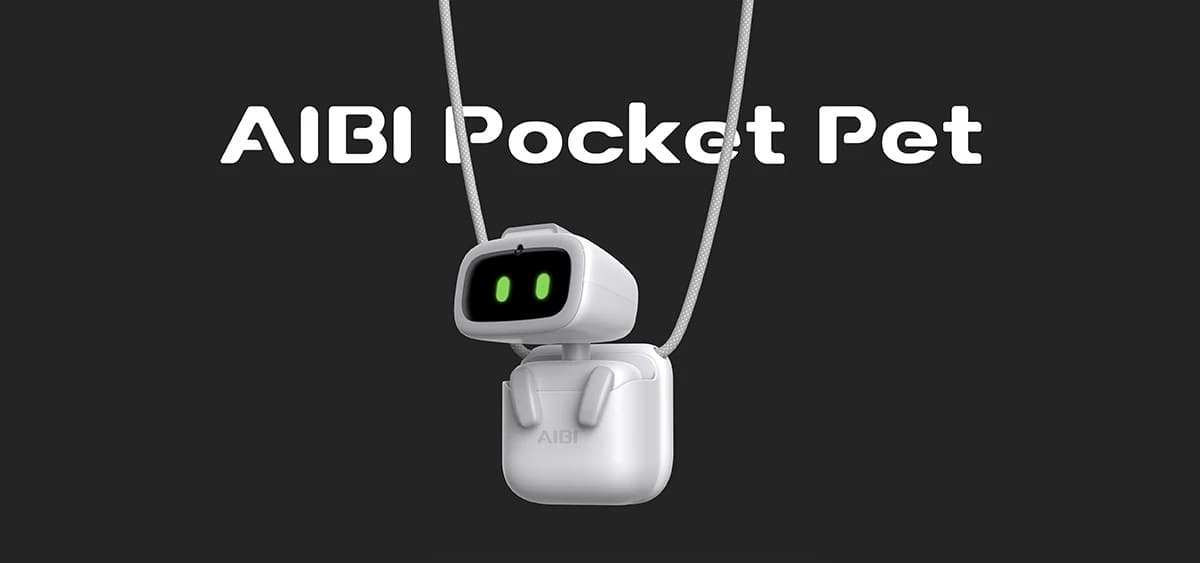
AIBI is designed to be a much smaller, more portable companion than EMO. It animates and turns rather than walking, combining a screen character, camera, voice commands, photos, reminders, small games, a wearable pocket, and cloud-connected answers in a device intended to move with its owner.
AIBI makes the strongest case when portability matters more than independent movement. Its official command set is unusually useful for evaluating the real product: a marked subset works offline, while more complex questions and several features require a network connection. Buyers should choose it for a compact companion experience, not assume it replaces a phone, smart speaker, home-automation hub, or programmable robot.
Best fit
- People who want a very small companion that can move between a desk and a wearable pocket
- Buyers interested in voice commands, photos, face recognition, reminders, and expressive reactions
- Owners willing to learn which commands work offline and which features depend on the network
Probably not for
- People who want a robot that walks around a desk or navigates a room
- Buyers expecting unrestricted conversation, music playback, smart-home control, or phone replacement
- Developers looking for an open robotics platform for custom code
Before you choose
Compare AIBI Pocket with the alternatives.
See which setup fits your space, budget and preferred way to interact.
Price and key facts
A normalized snapshot with evidence attached.
These fields use the same structure across every HomeRobotHQ profile. Each value is linked to its evidence, classified transparently, or marked as not published.
Official store price
AIBI Pocket price history
Checked
AIBI Pocket$249.00 USDPurchase · AvailableView price historyHide price history
How does this price compare?
Up to 90 days ending at the latest check · Oct 22, 2026.
12 recorded checks · Sep 2, 2026 – Oct 22, 2026
- Lowest in this range
- $249
- Highest in this range
- $249
Hover, tap or drag to inspect a check. With a keyboard, use the arrow keys, Home or End. The line connects recorded checks; prices between checks are unknown.
Same price as the previous check in this range.
Official-store checks for this variant. Prices may change between checks; shipping, taxes and checkout discounts are not included.
View all recorded prices (12)
| Date checked | Price | Status |
|---|---|---|
| $249.00 USD | Available | |
| $249.00 USD | Available | |
| $249.00 USD | Available | |
| $249.00 USD | Available | |
| $249.00 USD | Available | |
| $249.00 USD | Available | |
| $249.00 USD | Available | |
| $249.00 USD | Available | |
| $249.00 USD | Available | |
| $249.00 USD | Available | |
| $249.00 USD | Available | |
| $249.00 USD | Available |
- Connectivity
- Marked offline commands plus connected features Official source · Checked Open evidence ↗
- Cloud dependence
- Offline command subset plus cloud-connected answers HomeRobotHQ classification · Checked Open evidence ↗
- Charging
- Charging base; pocket charger included with new orders Official source · Checked Open evidence ↗
- Documented runtime
- Not published by manufacturer Not published · Checked
- Dimensions
- Not published by manufacturer Not published · Checked
- Weight
- Not published by manufacturer Not published · Checked
Additional documented facts
Price, delivery timing, taxes, shipping, and regional availability can change. Verify the current official listing or status source before making a purchase decision. View the reviewed price history →
Capabilities and limits
What can AIBI Pocket actually do?
LivingAI documents a mix of camera features, voice commands, expressive behavior, portable accessories, reminders, games, and online ChatGPT-assisted answers.
- 01Recognize registered faces, take and show photos, and identify supported objects through the camera
- 02Respond to touch, tapping, shaking, and being turned upside down with character animations
- 03Use supported voice commands for movement, volume, battery status, time, photos, lights, games, music-box behavior, and other interactions
- 04Provide weather, timers, notes, chat, and online answers, including ChatGPT-connected responses for complex questions
- 05Turn while on its base, travel in the wearable pocket, and enter a low-energy mode for a smaller portable companion routine
Important limitations
- AIBI can turn and animate but does not walk around a desk or navigate a home.
- Only commands marked with an asterisk in LivingAI's catalog are documented for offline mode; online Q&A and other features depend on connectivity and services.
- LivingAI's current first-party pages do not publish a complete conventional specification sheet with dimensions, weight, or a stated battery-runtime figure.
- The product is presented as a packaged companion rather than an open developer platform or general smart-home controller.
Software and setup
The app handles identity and setup; the command catalog defines what works online and offline.
The AIBI Pocket app is used to connect the robot, register a face, configure network, city, time zone, language, and preferences, and check identifying information for support.
LivingAI maintains a versioned voice-command catalog. Its asterisk notation is the clearest official way to distinguish supported offline commands from features that need the network.
Firmware can be checked and started with documented voice commands; available behavior can change as LivingAI updates the robot and its online services.
Place AIBI on its powered charger and keep the robot near the phone.
Install the AIBI Pocket app, connect to the robot, and configure its network, city, time zone, language, and preferences.
Register faces in the app before relying on face-recognition commands.
Install the current firmware, then test both marked offline commands and connected features before taking AIBI away from its regular setup.
Projects worth exploring
- Build a short list of favorite online and offline voice commands
- Register a face and test recognition, photography, and object-recognition prompts
- Create a timer, weather, note, and reminder routine
- Compare desk, wearable-pocket, charging, and low-energy use across a normal day
Privacy and connectivity
Portability makes the camera and microphone worth reviewing room by room.
AIBI combines a camera, face registration, microphone-driven commands, photos, an app, network access, and cloud-connected questions. Decide when and where those features should be active before carrying it through the home or outside.
LivingAI's privacy notice covers its mobile applications that link to the notice and says an app may request geolocation, Bluetooth, storage, and other device access. The notice predates AIBI, so confirm the policy and permissions shown in the current AIBI Pocket app during setup.
Use offline mode or low-energy mode when their documented limits fit the situation, review app permissions, remove unneeded photos and face records, and keep the firmware current.
From owners / home experience
How does AIBI Pocket hold up at home?
Owner accounts add real-world context to the source-backed profile above. They are personal experiences, not controlled tests or manufacturer specifications. We review submissions before publication and label whether ownership evidence was reviewed.
No owner reports have been published for this model yet.
Own AIBI Pocket? Share your experience
Tell us what works in your home and what falls short. Your report goes to our private editorial inbox. We may contact you before publishing a short excerpt.
Product ideas for this robot
Explore owner problems and proposed accessories.
Alternatives
Compare the role before the specification.
Sources and provenance
Primary sources reviewed.
Follow the sources for the specifications, software requirements, and policies discussed above. Our editorial approach explains how evidence is used.
- Official storeAIBI Pocket store listingOpen source ↗
LivingAI · Checked 2026-09-01
- Official product pageAIBI product overviewOpen source ↗
LivingAI · Checked 2026-09-01
- Official supportAIBI user manual and supportOpen source ↗
LivingAI · Checked 2026-09-01
- Official documentationAIBI English voice-command catalogOpen source ↗
LivingAI · Checked 2026-09-01
- Official storeAIBI Pocket Charger listingOpen source ↗
LivingAI · Checked 2026-09-01
- Official privacy policyLivingAI privacy noticeOpen source ↗
LivingAI · Checked 2026-09-01