Research verdict
A focused first robot for learning and play, with a subscription-shaped upgrade path.
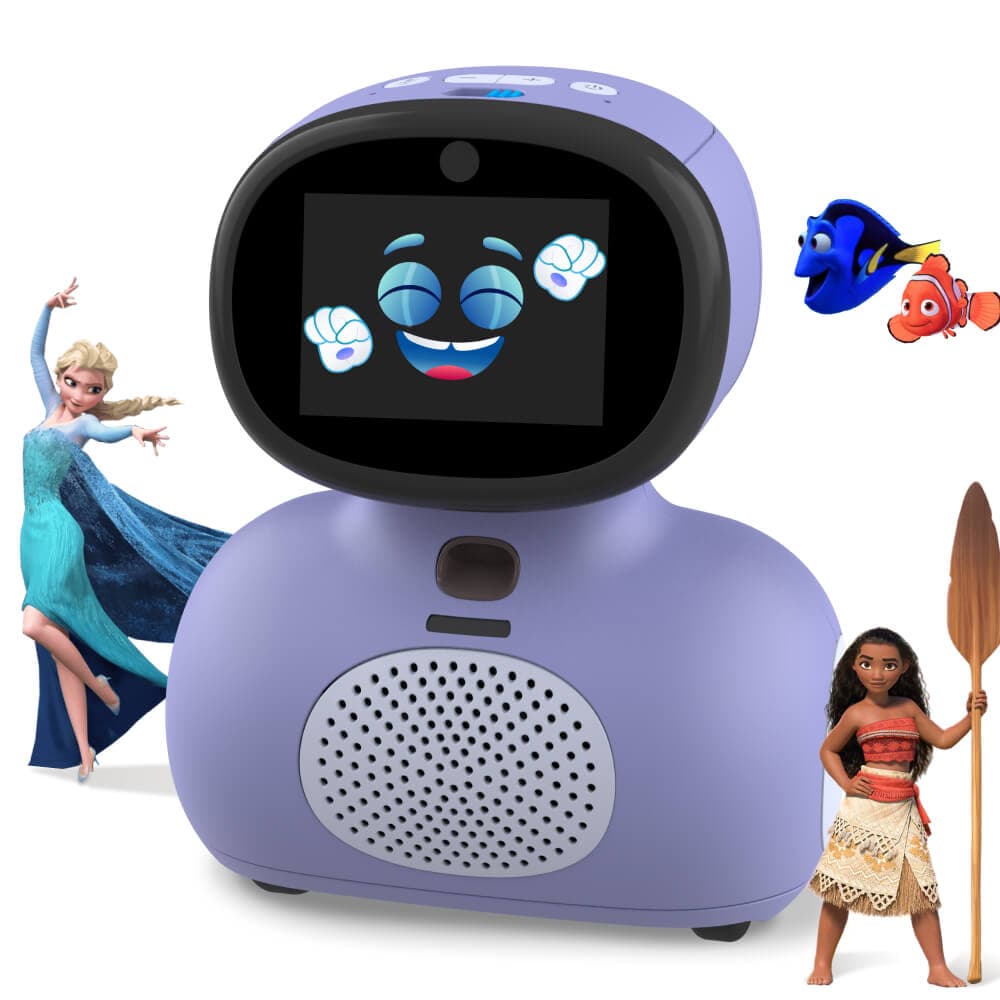
Miko Mini is a compact connected robot for families who want guided learning, conversation, stories, games, and expressive movement in one child-focused device. Its strongest value is the curated experience, while the optional Miko Max plan and child-data settings deserve attention before purchase.
Miko Mini makes more sense as a child-focused content and interaction device than as a general home robot. The $149 hardware price is approachable, but the experience, account setup, parental controls, connectivity, and optional premium library are all part of the real ownership decision.
Best fit
- Families wanting a compact robot built around guided learning and entertainment
- Children who respond well to voice, screen, stories, games, and animated movement
- Parents willing to configure an account, permissions, content, and usage limits
Probably not for
- Buyers looking for an open programming platform or general-purpose assistant
- Families that want an offline-first product with no account or cloud services
- Anyone assuming the base price includes the complete premium content library forever
Price and key facts
A normalized snapshot with evidence attached.
These fields use the same structure across every HomeRobotHQ profile. Each value is linked to its evidence, classified transparently, or marked as not published.
Official store price
Miko Mini price history
Checked
Purple$149.00 USDPurchase · AvailableView price historyHide price history
How does this price compare?
Up to 90 days ending at the latest check · Oct 22, 2026.
12 recorded checks · Sep 2, 2026 – Oct 22, 2026
- Lowest in this range
- $149
- Highest in this range
- $149
Hover, tap or drag to inspect a check. With a keyboard, use the arrow keys, Home or End. The line connects recorded checks; prices between checks are unknown.
Same price as the previous check in this range.
Official-store checks for this variant. Prices may change between checks; shipping, taxes and checkout discounts are not included.
View all recorded prices (12)
| Date checked | Price | Status |
|---|---|---|
| $149.00 USD | Available | |
| $149.00 USD | Available | |
| $149.00 USD | Available | |
| $149.00 USD | Available | |
| $149.00 USD | Available | |
| $149.00 USD | Available | |
| $149.00 USD | Available | |
| $149.00 USD | Available | |
| $149.00 USD | Available | |
| $149.00 USD | Available | |
| $149.00 USD | Available | |
| $149.00 USD | Available |
Other variants and payment options (1)
Blue$149.00 USDPurchase · AvailableView price historyHide price history
How does this price compare?
Up to 90 days ending at the latest check · Oct 22, 2026.
12 recorded checks · Sep 2, 2026 – Oct 22, 2026
- Lowest in this range
- $149
- Highest in this range
- $149
Hover, tap or drag to inspect a check. With a keyboard, use the arrow keys, Home or End. The line connects recorded checks; prices between checks are unknown.
Same price as the previous check in this range.
Official-store checks for this variant. Prices may change between checks; shipping, taxes and checkout discounts are not included.
View all recorded prices (12)
| Date checked | Price | Status |
|---|---|---|
| $149.00 USD | Available | |
| $149.00 USD | Available | |
| $149.00 USD | Available | |
| $149.00 USD | Available | |
| $149.00 USD | Available | |
| $149.00 USD | Available | |
| $149.00 USD | Available | |
| $149.00 USD | Available | |
| $149.00 USD | Available | |
| $149.00 USD | Available | |
| $149.00 USD | Available | |
| $149.00 USD | Available |
- Cloud dependence
- Account, app, connected content, and voice services HomeRobotHQ classification · Checked Open evidence ↗
- Developer access
- Closed child-focused consumer platform HomeRobotHQ classification · Checked Open evidence ↗
- Charging
- USB-C; official guidance varies from about 60 to 90 minutes Official source · Checked Open evidence ↗
- Documented runtime
- Official guidance varies from 1 to 3 hours of active use Official source · Checked Open evidence ↗
- Weight
- Not published by manufacturer Not published · Checked
- Subscription
- $14.99/month or $99/year list price; promotional pricing may vary Official source · Checked Open evidence ↗
Additional documented facts
Price, delivery timing, taxes, shipping, and regional availability can change. Verify the current official listing or status source before making a purchase decision. View the reviewed price history →
Capabilities and limits
What can Miko Mini actually do?
Miko documents a mix of voice interaction, educational activities, stories, games, movement, visual sensing, and parent-managed content.
- 01Respond to supported voice requests and deliver child-focused questions, stories, rhymes, games, and learning activities
- 02Move on rubber wheels, animate on its display, play audio through a 3 W speaker, and react during activities
- 03Use a wide-angle HD camera, odometric sensors, and connected services to support interactive experiences
- 04Provide a free content tier, with a larger branded and educational catalog through optional Miko Max
- 05Give parents app-based setup, child-profile, progress, content, and screen-time controls
Important limitations
- Miko's current official pages do not agree on active battery life: support materials describe about one or two hours, while the product page states up to three hours.
- The robot is designed around a Miko account, mobile setup, Wi-Fi, and connected content rather than offline-only use.
- Miko Max is optional, but much of the larger premium library sits behind the monthly or annual plan.
- This is a learning and entertainment companion, not a household mobility, monitoring, or open robotics platform.
Software and setup
The Miko app and account are part of the product, not optional extras.
Initial setup uses the Miko app to create an adult account, provide parental consent, create a child profile, and pair the robot.
The free tier includes a smaller set of voices, games, rhymes, questions, and content. Miko Max expands the catalog with premium learning and entertainment partners.
Miko's privacy policy describes optional child-profile details, voice-command processing, camera controls, and parental consent. Review those settings before handing over the robot.
Charge the robot, install the Miko app, and create the adult account.
Complete parental consent and create the child profile with only the details you want to provide.
Pair by Bluetooth, join Wi-Fi, and review nearby-device, location, camera, and microphone permissions.
Set content and time limits, then decide whether the Miko Max trial is useful before it renews.
Projects worth exploring
- Build a weekly learning routine around a small set of repeatable activities
- Compare the free library with Miko Max before paying for a full year
- Practice camera-shutter and microphone-mute habits with the child
- Track which activities remain useful after the initial novelty period
Privacy and connectivity
A robot for children requires a stricter privacy review.
Miko Mini has a camera, microphones, Wi-Fi, an adult account, and a child profile. The physical camera shutter and microphone control are useful, but parents still need to configure the service deliberately.
Miko says voice audio may be transmitted for transcription and deleted after transcription, while wake-word accent training runs locally. Its policy also describes optional child details, preferences, and parental consent.
Use the minimum child-profile information, keep the robot out of private rooms, review app permissions, and periodically delete data that is no longer useful.
From owners / home experience
How does Miko Mini hold up at home?
Owner accounts add real-world context to the source-backed profile above. They are personal experiences, not controlled tests or manufacturer specifications. We review submissions before publication and label whether ownership evidence was reviewed.
No owner reports have been published for this model yet.
Own Miko Mini? Share your experience
Tell us what works in your home and what falls short. Your report goes to our private editorial inbox. We may contact you before publishing a short excerpt.
Alternatives
Compare the role before the specification.
Sources and provenance
Primary sources reviewed.
Follow the sources for the specifications, software requirements, and policies discussed above. Our editorial approach explains how evidence is used.
- Official product pageMiko Mini product pageOpen source ↗
Miko · Checked 2026-09-01
- Official specificationsMiko Mini technical specificationsOpen source ↗
Miko · Checked 2026-09-01
- Official setup guideMiko Mini setup guideOpen source ↗
Miko · Checked 2026-09-01
- Official FAQMiko Mini FAQOpen source ↗
Miko · Checked 2026-09-01
- Official supportMiko Mini charging guideOpen source ↗
Miko · Checked 2026-09-01
- Official storeMiko Max plansOpen source ↗
Miko · Checked 2026-09-01
- Official privacy policyMiko privacy policyOpen source ↗
Miko · Checked 2026-09-01